A long shot but, here goes ...

ST840

Well-Known Member
Joined
22 Jun 2014
Messages
1,166
Location
Southampton
Visit site
Hello all.
I have an old navi control AP 103 gold autopilot unit fitted to my boat which was connected to an older geonav multi plotter. I have upgraded the plotter to two Garmin gpsmap 8410’s.
I now want to connect the old navicontrol 103 to the Garmin’s but, I cannot figure out how it’s done. I don’t need all the features I just want it to hold a course. No where on line can I find a manual for one ! If by any long shot of a chance one of you good fellows has a manual for this unit, could I borrow it ??
I don’t really want to spend £1500 on a retro fit kit from Garmin as I feel even this may not be the correct thing. I just need to get the two units talking !!
Any help will be great fully appreciated !!
Many thanks in advance .
 
Hello all.
I have an old navi control AP 103 gold autopilot unit fitted to my boat which was connected to an older geonav multi plotter. I have upgraded the plotter to two Garmin gpsmap 8410’s.
I now want to connect the old navicontrol 103 to the Garmin’s but, I cannot figure out how it’s done. I don’t need all the features I just want it to hold a course. No where on line can I find a manual for one ! If by any long shot of a chance one of you good fellows has a manual for this unit, could I borrow it ??
I don’t really want to spend £1500 on a retro fit kit from Garmin as I feel even this may not be the correct thing. I just need to get the two units talking !!
Any help will be great fully appreciated !!
Many thanks in advance .

You need to use nmea0183, which is a 2-wire connection system. The garmin talks; the 103 listens to what garmin says, which is the only direction of communication you need for this. The garmin manual/website will tell you which two garmin loom wires are "nmea0183 out". You need to connect those 2 wires to "nmea 0183 in" on the 103. I don't know which two wires or terminals on the 103 are "nmea 0183 in" but you could probably narrow down the choice - they will be voltage free for starters. Also it wont matter if you connect them wrongly, so you could just keep trying different choices till you hit lucky (provided you do not connect the garmin "nmea0183 out" to the +or - 12v power supply terminals on the 103).
 
http://www.sgtechno.it/Documents/Geonav/Piloti/AP103_Gold.pdf

Mapim can translate no doubt. It looks like you might have Nmea 2000 though which would be much easier.

If not, white and brown wires look like receive on tb1 socket of the Auto pilot control box with a bare wire as shield probably.

http://static.garmin.com/pumac/GPSMAP_8x10-8x12-8x16_Install_EN.pdf

Looks like your unit has a Nmea cable with audio connectors too. Pink and Grey wires are the NMEA out from the Garmin with brown as shield.

https://buy.garmin.com/en-US/US/p/641589

Couldn’t find a UK supplier.
 
Last edited:
So it’s just a case of connecting pink and grey to white and brown ?? Is it really that easy ?
The reason I say that is because my installer says he’s baffled as to how to do it, said it probably wasn’t possible to connect the two units (we don’t have a manual)!
If it’s as easy as you suggest then I could do that , is there a special way of permanently connecting the wires or is it just strip back, twist together and fit in a connector block ?
Sorry for all the questions !!
 
Perhaps I’m being dull, but since when did an autopilot need to talk to a plotter to hold a course? The autopilot should steer whatever course you dial in.

But then I’m speaking as one whose plotter can chat merrily to the autopilot all day if I want but I’ve disabled the functionality. Too often I’d be pressing buttons on the plotter to see where things were or how far away they were and I’d suddenly find we were altering course because the plotter thought I wanted to go there.
 
As I understand it (and that’s not too much) the auto pilot gets its heading and positioning by means of the gps antenna that’s connected to the plotter. Then the plotter tells the auto pilot !!
Happy to be educated otherwise though !!
 
As I understand it (and that’s not too much) the auto pilot gets its heading and positioning by means of the gps antenna that’s connected to the plotter. Then the plotter tells the auto pilot !!
Happy to be educated otherwise though !!

Not in any autopilot I’ve ever worked with.

Autopilot’s usually know which direction the ships head is pointing from a gyro or electronic compass built in (or separate). Many (most?) can work entirely independently of the plotter. Course calculated via the GPS doesn’t react quickly enough to allow for good autopilot steering.
 
Well now I am confused ......
Can anyone clarify this either way ??

Autopilots are normally standalone and use an electronic compass (fluxgate) for the heading and as John says, they should independently hold a course without the need for a plotter. Point the boat, set autopilot, use the arrows on your control head to alter course.

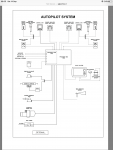
If you look at the layout diagram in the ap103 manual I attached....the items with solid lines are the must have items which include a compass unit. The dash lines are optional.

FD89DF18-0513-4AA5-97AD-10386F27CF4A.png

Having the Garmin plotter connected means you can plot a course on your chart and the Garmin will send info to the auto pilot as you go along to stay on your plotted course, make turns etc....

Pictures of the connections on your ap control box would be helpful. We’re looking for an nmea2000 socket.....then life is much easier!
 
Last edited:
Ok this is interesting as before plotters were changed the AP worked fine but, since the change over it keeps setting off an alarm telling me that it has no signal. The electrician stated that it’s because it’s not connected to the plotter and he didn’t know how to do it !!!!
I will try to take a photo of the back of the unit and post it here !
 
What plotter units did you take out?

It sounds like they where connected before so it’s just figuring out how. NMEA 0183 is the most obvious so hopefully the wiring is still there.

Are your garmin units new or used? They might have come with the cable you need

As your ap103 was setup previously with plotter input, you’re getting an alarm as the input is now missing. It’s quite possible you can alter the settings in the ap103 to turn the plotter input off and it will work stand alone once again.
 
Last edited:
The AP was connected to an old geonav multi plotter. It’s been replaced with new twin Garmin gpsmap 8410’s.
Without a manual for the AP I have no clue how to adjust settings !!
 
Thank you so much for the help. I will take a deeper look into this in the week. There should be cables on board if they came in the box with the plotters. I will txt the engineer to ask where they are !! ??
 
Top