5v DC stable power supply & CCTV camera direct to IPad or iPhone

superheat6k

Well-Known Member
Joined
10 Jan 2012
Messages
6,798
Location
South Coast
Visit site
Can someone suggest a fairly simple circuit or commercial device to provide 5vdc stable at around 500 ma from ships 12-14 vdc.

Then a CCTV camera I can use in my engine space that will connect direct to my iPhone or IPad without a dedicated wifi system aboard, and without going via the net, or am I wanting something not yet invented.

Finally I then want to tie in a rear view reverse image camera for rear view and parking astern.

Anyone ?
 
You want a wireless IP camera. Plenty on eBay.

Almost too much choice and too many variations so I really wanted to see what someone else had tried. Couldn't find compatible cameras with a reverse and normal view, so I can flick between two cameras, plus where the reverse has a decent IP (ingress protection ) rating. Sorry for being fussy.

Thanks all for the power supply links. Now I just need the cameras and App.
 
Last edited:
Almost too much choice and too many variations so I really wanted to see what someone else had tried. Couldn't find compatible cameras with a reverse and normal view, so I can flick between two cameras, plus where the reverse has a decent IP (ingress protection ) rating. Sorry for being fussy.

Thanks all for the power supply links. Now I just need the cameras and App.
Should be viewable through the web browser.
 
Ones that communicate DIRECTLY to a phone/tablet without communicating via the internet? :confused:

Edit: Oh I see now ...... to look at the engine while he is ONBOARD. I read the OP as wanting to monitor the CCTV from ashore or such :o
Yes - precisely. On a flybridge cruiser it would nice to see what's happening in the engine space without having to leave the fly, as I like to check the engines at least every 1/2 hour. A 3G signal is not always available. Having remote viewing when on the berth may be a further advantage I suppose, but looking at a static engine room from ashore may prove to be a bit like watching paint dry after a few looks.
 
There are several suitable devices on Amazon. e.g.
http://www.amazon.co.uk/Converter-Step-Down-Power-Supply/dp/B009P0504M
http://www.amazon.co.uk/Vktech-Double-DC-DC-Converter-Module/dp/B00CTGB24G
http://www.amazon.co.uk/Generic-Output-Step-Down-Module-Charging/dp/B00EQ1ZOVO

Prices seem to start at under £4 incl. delivery and can have just +/- outlet wires, 1,2 or even 4 USB outlets.

+/- Wires would involve some soldering to connect a USB and the 4 outlet version I say had them PCB mounted.

Easiest might by to buy one with 2 USB fly leads. You could plug iPad into one and cut other to get +/- for CCTV power if it didn't use USB.

UPDATE: Weird, I only saw posts #1 & #2 when I replied and the others appeared after posting my reply. My laptop must have frozen when scrolling or some other weird effect.

N.B. You might find that the output from some devices (even 3A ones) might be insufficient to keep an iPad charged. I think that the iPad might check if USB data wires are shorted together to work out if it is connected to a charger. I have heard people moan that a 3A supply wasn't keeping up with their iPad because it decided it wasn't connected to a charger so only charged at max. 500mA.
 
Last edited:
Thanks Mistroma, but the issue now is the camera selection.

I want to use my IPad to view the cameras offshore with no internet link, no 3G.

I would like 2 cameras - 1 reversed for rear view, 1 normal in the engine bay

Then yes if it can be used for remote viewing all the better when away from the boat

I can't find anything that combines these functions.
 
Thanks Mistroma, but the issue now is the camera selection.

I want to use my IPad to view the cameras offshore with no internet link, no 3G.

I would like 2 cameras - 1 reversed for rear view, 1 normal in the engine bay

Then yes if it can be used for remote viewing all the better when away from the boat

I can't find anything that combines these functions.
Do you know what an IP camera is?
 
Do you know what an IP camera is?
Hope you do not mind if I have a go. I just have this image of you banging your head against a brick wall.:D

DSC_0017[1].jpg
Sorry the picture is not great......
The Samsung phone is seeing the picture from the JVC camcorder via Wi-Fi. There is no 3G or internet involved. You only need that if you want to have a view from half way round the world and since you will hopefully be on board your boat whilst docking it seems unlikely.

Your phone connects direct to the camera by choosing that connection in your wifi settings like you would any other network.

The camcorder above will allow recording of video, pictures and zoom in and out.

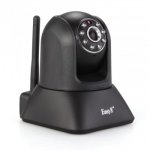
There are many normal IP cameras (one below) that will allow pan & tilt & have some night vision although that is not always great with lots of shiny bits of engine to reflect off.
Simple web cam.jpg

You just have to choose the one that has an app for your Iphone/pad. Most will and will allow viewing of more than one camera. Alternatively you can use your laptop, again by just choosing the Wi-Fi from the camera instead of an internet connection.

Just in case it hasn't got through yet..........You do not need an a 3G or internet connection to make this work...........But if you have then remote viewing is possible:)

Hope that helps.
 
Last edited:
Hope you do not mind if I have a go. I just have this image of you banging your head against a brick wall.:D

View attachment 36861
Sorry the picture is not great......
The Samsung phone is seeing the picture from the JVC camcorder via Wi-Fi. There is no 3G or internet involved. You only need that if you want to have a view from half way round the world and since you will hopefully be on board your boat whilst docking it seems unlikely.

Your phone connects direct to the camera by choosing that connection in your wifi settings like you would any other network.

The camcorder above will allow recording of video, pictures and zoom in and out.

There are many normal IP cameras (one below) that will allow pan & tilt & have some night vision although that is not always great with lots of shiny bits of engine to reflect off.
View attachment 36862

You just have to choose the one that has an app for your Iphone/pad. Most will and will allow viewing of more than one camera. Alternatively you can use your laptop, again by just choosing the Wi-Fi from the camera instead of an internet connection.

Just in case it hasn't got through yet..........You do not need an a 3G or internet connection to make this work...........But if you have then remote viewing is possible:)

Hope that helps.
Thank you.

It doesn't help that in this application IP has two meanings, I assume Internet Protocol - hence my mis- assumption this requires an internet link, plus Ingress Protection, further complicated by the fact that the technical descriptions for these things are hardly concise. It would be useful if perhaps it had a third meaning - Idiot Proof !

I get on OK with computers but I am not an internet geek, therefore I felt it simpler to ask if someone else has done this.
 
Aren't we getting across ourselves with IP (Ingress Protection?) and IP ( Internet Protocol?)

edit:too slow to type...
 
I get on OK with computers but I am not an internet geek, therefore I felt it simpler to ask if someone else has done this.
A friend has one of these so I will try it this week to see that it does what it says http://www.ebay.co.uk/itm/400454835459 Although I do not have any apples:)

Wouldn't you be better off with a wired cameras to the fly bridge for both? Have you got a chart plotter up there that accepts video in?
 
Last edited:
A friend has one of these so I will try it this week to see that it does what it says http://www.ebay.co.uk/itm/400454835459 Although I do not have any apples:)

Wouldn't you be better off with a wired cameras to the fly bridge for both? Have you got a chart plotter up there that accepts video in?

I have a Garmin GPSMAP750, which is excellent in all other regards but it doesn't have a video input. Most reverse camera monitor screens won't be IP65+ rated, and I have little spare space anyway.

If your friends camera works I would appreciate if you could post the make and model.
 
The camera link I posted above does not work direct. You need a router. I have found another similar one for around £40 that does work but am trying to confirm the range.....

Depending on how much you want to spend the camcorder I use is a.....
http://www.jvc.co.uk/product.php?id=GZ-VX715BEK&catid=100170
There is a more expensive and cheaper version in the family.

There is also http://www.dogcamsport.co.uk/sony-hdr-as15-helmet-camera.html which comes with a waterproof case....

There are many on here that use a Go Pro. I have never used one myself but have been told that the wifi delay can be as long as 4 seconds which when reversing can mean alot;)

I will post again when I get an answer on the other one......
 
Top